

Gluteal Amnesia and Back Pain
Your glutes have forgotten how to work. It sounds strange,

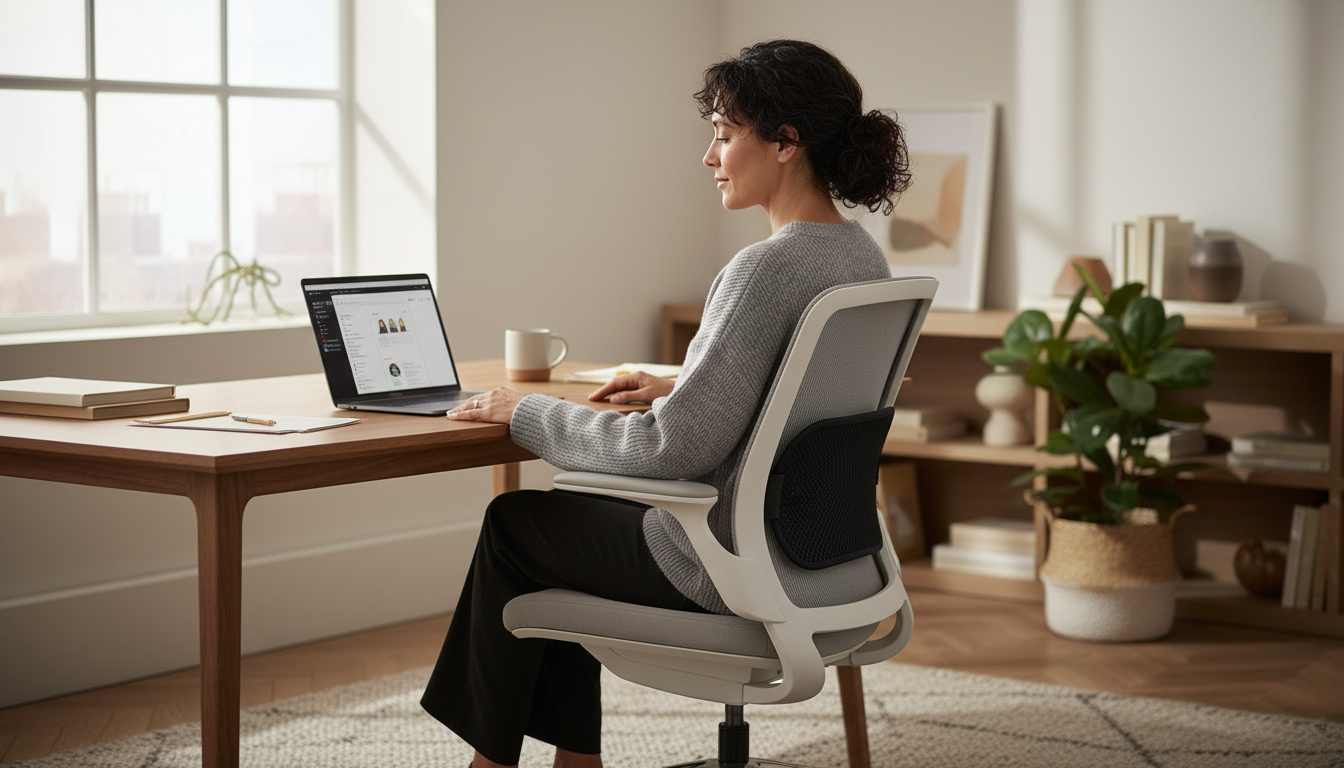
A lumbar pillow only works if you use it correctly. Place it in the wrong spot, and you might actually make your back pain worse.
📋 Table of Contents

The good news? Proper placement takes about 30 seconds once you know the technique. This guide shows you exactly where to position your lumbar support for maximum relief—whether you’re at your desk, in your car, or relaxing at home.
The most common mistake people make is placing their lumbar pillow too high or too low. Here’s how to find the perfect position:
Your lumbar region is the inward curve of your lower spine—roughly from your waist to just above your tailbone. This area (vertebrae L1-L5) naturally curves inward toward your belly.
When you sit in most chairs, a gap forms between this curve and the chair back. That’s exactly what your lumbar pillow should fill.
Here’s the easiest way to find the right placement:
For most people, this places the center of the pillow at or slightly below belt level.
Placing the pillow at mid-back (thoracic region) pushes your shoulders forward and can create tension in your upper back and neck.
Placing the pillow near your tailbone tilts your pelvis awkwardly and doesn’t support your lumbar curve at all.
The pillow fills the natural gap in your lower back, supporting the inward curve of your lumbar spine. Your shoulders remain naturally positioned, and you feel supported—not pushed forward.
Follow these five steps for perfect placement every time:
While standing, place your hand on your lower back. Feel the inward curve? That’s your lumbar region.
The hand test: Sit in your chair normally (without the pillow). Slide your hand behind your lower back. If there’s a gap between your back and the chair, that’s exactly where your lumbar pillow belongs.
Place the pillow against the chair back with:
For contoured pillows (like the LumbarPillow Orthopedic), the curved side should face toward your back.
Most quality lumbar pillows have adjustable straps. Here’s how to secure them:
Pro tip: If straps don’t fit your chair, you can often wedge the pillow securely between your back and the chair back—the pressure of your body will hold it in place.
Sit back against the pillow and check:
Signs it’s positioned correctly:
Give yourself 15-30 minutes to see how the position feels during actual use. You may need small adjustments:
New lumbar pillows may feel firm at first. This is normal—high-density memory foam softens slightly with use while maintaining its support. Give your body 3-5 days to adjust. If discomfort persists, recheck your placement before assuming the pillow isn’t right for you.
Your pillow can work in multiple locations—but each requires slightly different setup:
Office chairs present unique challenges: they roll, recline, and you’re constantly shifting as you work.
Tips for office chairs:
Adjusting chair settings to work with your pillow:
Car seats are contoured differently than office chairs, and vibration adds another variable.
Tips for car use:
Long drive tips:
Most gaming chairs come with built-in lumbar pillows—but these are often too small or poorly shaped to provide real support.
Tips for gaming chairs:
Recliners change your spine’s angle as you recline, which affects pillow positioning.
Tips for recliners:
Wedge the pillow between your lower back and the chair—straps may not be needed if the recliner’s shape holds the pillow in place.
Couches are often too soft and deep for proper posture, making lumbar support especially important.
Tips for couch use:

Even with a quality lumbar pillow, these mistakes can reduce effectiveness:
If your pillow is pressing into your mid-back or shoulder blade area, it’s too high. This pushes your shoulders forward and can cause upper back and neck tension.
Fix: Move the pillow down until it’s at or below your belt line.
A pillow at your tailbone doesn’t support your lumbar curve at all. It may even tilt your pelvis in an awkward position.
Fix: Move the pillow up until it fills the natural curve in your lower back.
A pillow that’s too soft won’t provide adequate support. One that’s too firm may feel uncomfortable at first (though this usually improves with break-in).
Fix: High-density memory foam provides the best balance—firm enough to support, soft enough to conform.
A pillow that constantly slides down is worse than no pillow. You’ll spend all day readjusting instead of working.
Fix: Use the adjustable straps. Tighten until the pillow stays in place when you lean back and move around.
If you perch on the front edge of your seat, the best lumbar pillow in the world can’t help you.
Fix: Sit all the way back so your lower back is against the pillow.
If you’ve never used lumbar support before, your muscles may need time to adjust:
Some people adjust immediately; others need the full week. Listen to your body.
Lumbar support is generally safe for all-day use, but watch for:
These typically indicate a positioning problem rather than overuse—recheck your setup.
Even with perfect lumbar support, you should still:
Lumbar support improves sitting—it doesn’t replace the need for movement.
Regular cleaning extends your pillow’s life and keeps it fresh:
Weekly:
Monthly:
Most lumbar pillow covers are machine washable:
Quality memory foam lumbar pillows last 2-3 years with daily use. Replace if:
Lumbar pillows designed for sitting aren’t ideal for sleep. For nighttime back support, consider a pillow under your knees (back sleepers) or between your knees (side sleepers). These positions maintain spinal alignment better than a lumbar pillow while lying down.
Tight enough that the pillow doesn’t shift when you lean back or adjust position, but not so tight that it distorts the pillow’s shape. The pillow should sit naturally against the chair back with gentle, secure pressure.
Mild discomfort for the first 3-5 days is normal—your muscles are adapting to a new position. However, if you experience sharp pain or the discomfort increases, check your positioning. Too-high placement is the most common cause of initial discomfort.
Most lumbar pillows work on most chairs with backs. However, very curved or bucket-style seats may require adjustment. Backless stools and benches don’t work with lumbar pillows. For unusual chairs, test the fit before committing to all-day use.
Many people notice immediate relief—within the first day of use. For others, improvement comes gradually over 1-2 weeks as posture improves and muscles adjust. If you don’t notice any improvement after 2-3 weeks of proper use, consult a healthcare provider about your back pain.
Most built-in chair lumbar support is inadequate. If you still experience back pain with your chair’s built-in support, adding a dedicated lumbar pillow typically provides better results. Try setting the built-in support to minimum and using a quality pillow instead.
Ready to put this into practice?
Our orthopedic lumbar pillow features AirFlex™ memory foam with an ergonomic contour that makes proper placement easy. Feel the difference within minutes.
30-Day Money-Back Guarantee | 2-Year Warranty | Free Shipping
Your glutes have forgotten how to work. It sounds strange,

Your hip flexors are the hidden culprits of desk-job back
Your back is stiff, tight, and angry. And you’ve got

That nagging pain at the base of your spine—right where

Sitting with a herniated disc can feel like torture. Every
Your desk chair is failing you. Even if you paid

That deep ache in your buttock that won’t quit? The

You’ve blamed your chair for years. And you’re probably right—but

Your back is aching right now, isn’t it? That dull
Is your lower back screaming at you by 3 PM?